Home Inventory Software That Protects What Matters Most
Build a complete room-by-room record of your belongings, attach photos and receipts, and export insurer-ready reports when you need them.
Why a Home Inventory Matters More Than You Think
After a fire, burglary, or other loss, trying to remember everything you owned is stressful and overwhelming. A detailed home inventory gives you a clear record of your belongings so you can work with your insurance company with confidence.
Make claims easier to process
Insurance adjusters want documentation. A complete list of items, photos, receipts, and values helps you demonstrate what you owned and what it was worth.
Avoid missed items and underpayments
When you're stressed, it's easy to forget rooms, closets, and drawers. A structured inventory reduces the chance you leave money on the table.
Stay prepared before anything happens
Responsible homeowners keep records up to date over time. Home Contents List Pro makes it easier to add and update items as your home changes.
How Home Contents List Pro Works
The app guides you through your home room-by-room so you can build a complete and organized record of what you own, including photos, receipts, and insurance-ready exports.
Define the rooms and areas in your home
Start by creating a list of rooms and spaces: living room, bedrooms, kitchen, garage, storage, and more. This structure keeps your inventory organized and easy to navigate later.
Add items with detailed information
For each item, record its name, category, replacement price, purchase date, condition, model or serial number, and any other details your insurer may ask for during a claim.
Attach photos, receipts, and documentation
Upload images of the item, receipts, invoices, or appraisals. Having this documentation stored in one place helps prove ownership and value if you ever need to file a claim.
Export insurer-ready reports whenever you need them
Create customized export templates that match your insurance company's preferred column names and order. Download CSV or Excel files ready to send with your claim.
Built for Real Insurance Needs, Not Just Lists
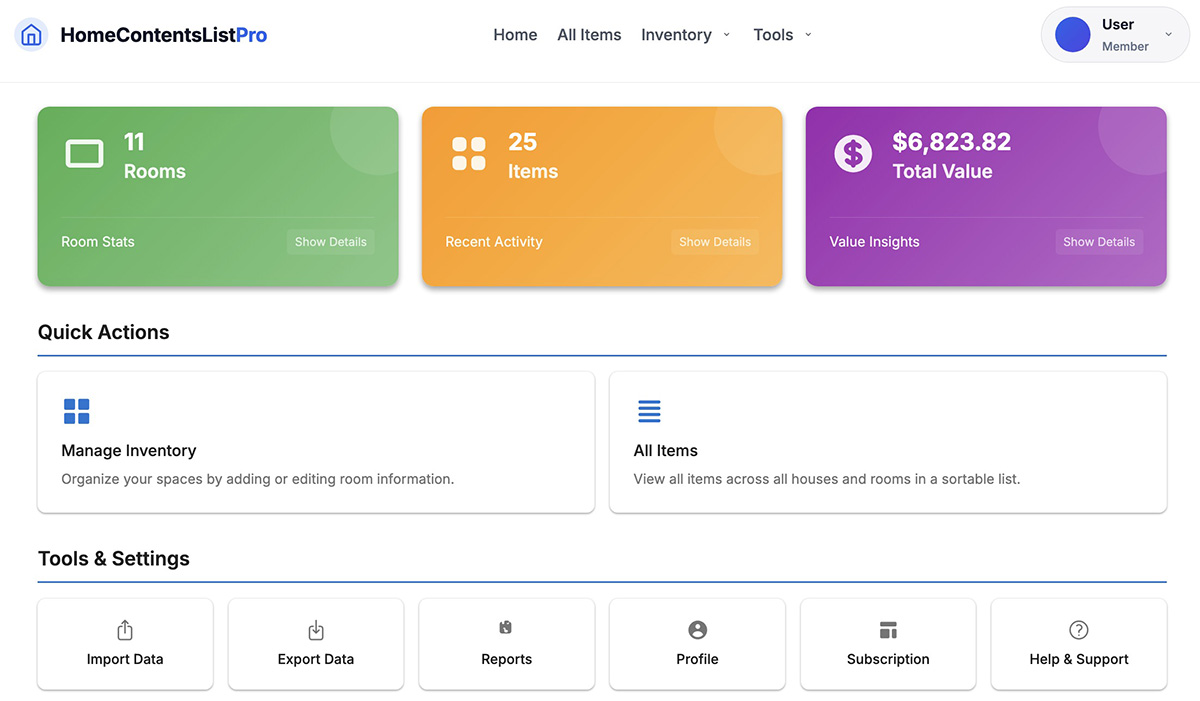
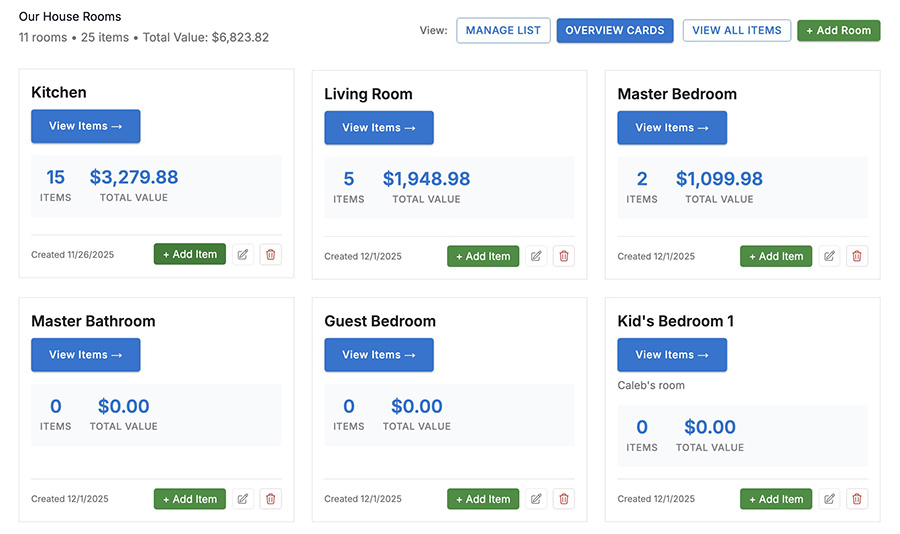
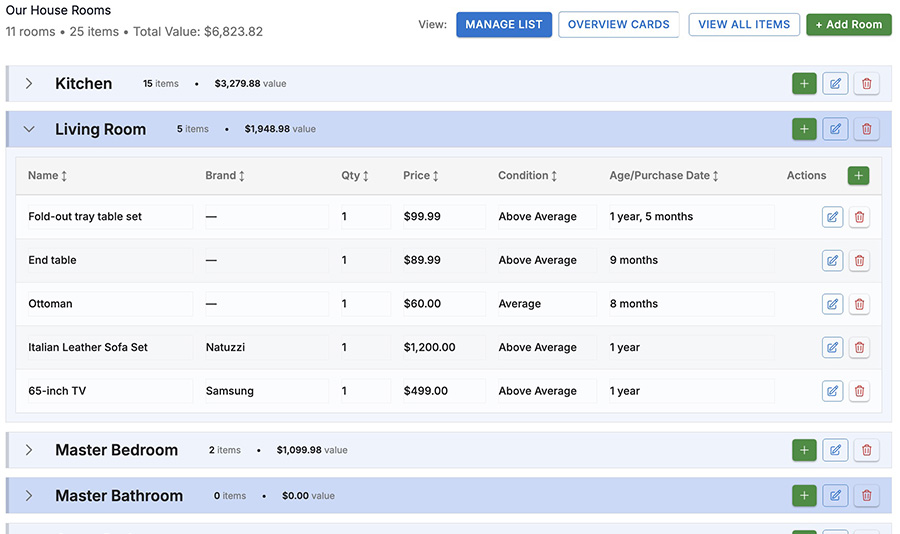
Home Contents List Pro combines a clear dashboard, room-level summaries, and deep item details so you can prove what you owned and what it was worth. It's much more than a simple spreadsheet or checklist.
Room-by-room organization
Create a clear structure for every room, floor, and storage area so you can quickly see what was in each space.
Photos & receipts per item
Attach images and receipts directly to items to support claims and show condition before a loss.
Customizable export templates
Match your insurer's preferred format with customizable columns, names, and ordering in CSV or Excel.
Detailed item fields
Store brand, model number, purchase date, price, condition, and more, so you're ready for follow-up questions.
Cloud-based and always available
Access your home inventory from any device with internet access. No more relying on a single local file.
Export anytime, update over time
Download updated reports whenever you add or change items, and keep your inventory up to date over the years.
Capture the details insurers care about
For each item, you can record its name, room, quantity, price, brand, model, serial number, purchase details, condition, age, notes, and attach photos or receipts. Everything lives in one place, ready to export when you need it.

Import your spreadsheets, export insurer-ready reports
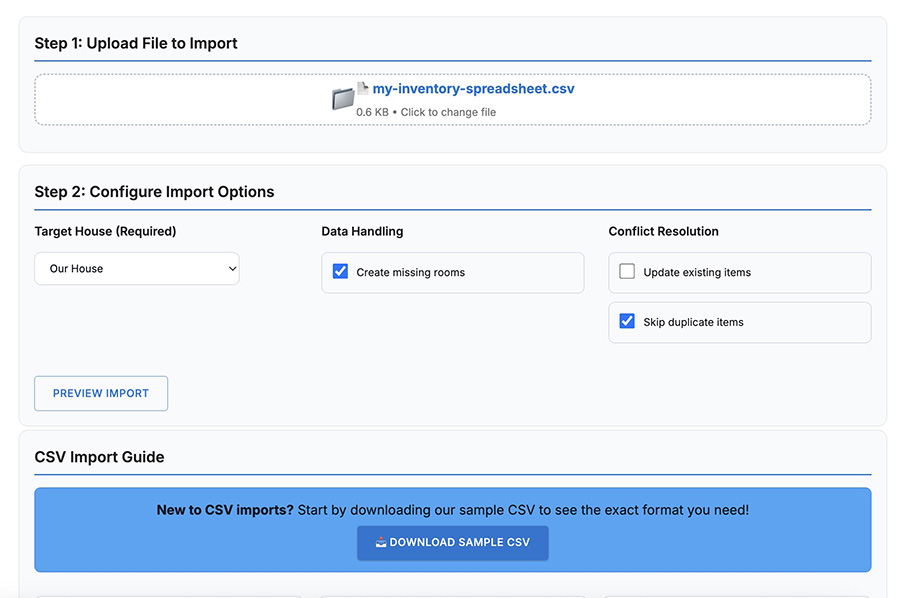
Already started a home inventory in Excel or Google Sheets? Bring that work into Home Contents List Pro with a guided CSV import, then use the app to enrich your data, attach photos and receipts, and export clean reports in the layout your insurer expects.
Start from the spreadsheet you already have
Use the CSV import guide to see exactly which columns are required and which ones are optional. Download a sample CSV, paste in your existing data, and upload it into the app without having to start from scratch.
- Download a sample CSV with the structure already defined
- Use required columns like Item Name and Room Name, plus optional details
- Preview your data before import to catch errors early
Export data in the exact format your insurer prefers
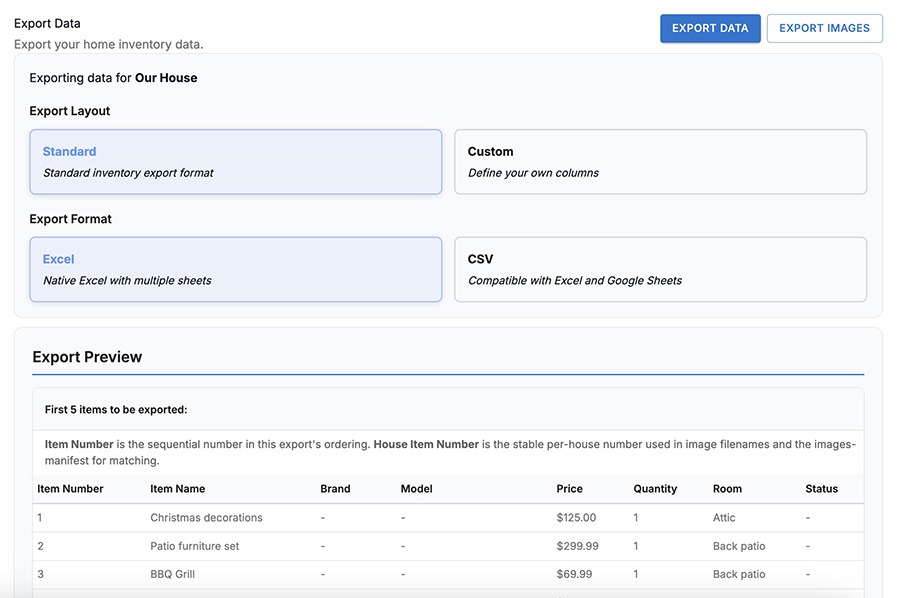
When it's time to make a claim, you can export your home inventory as Excel or CSV using either a standard layout or your own custom column setup. Preview the first rows so you know your report looks right before you download it.
- Choose between Standard and Custom export layouts
- Export to native Excel or CSV compatible with Excel and Google Sheets
- Review an export preview with item name, brand, price, and more
Why Home Contents List Pro Beats a Spreadsheet
Many homeowners start with a spreadsheet. It works at first, but quickly becomes fragile, hard to update, and difficult to adapt to what your insurance company really needs. Home Contents List Pro is designed to solve those problems.
| What you need | Spreadsheet | Home Contents List Pro |
|---|---|---|
| Room-by-room organization that stays consistent | ✕ Easy to lose structure or mix rooms and items over time | ✓ Built-in room definitions and navigation for every item |
| Photos and receipts attached to each item | ✕ Requires separate folders, filenames, and manual linking | ✓ Upload images and receipts directly to each inventory item |
| Custom insurance export formats | ✕ Manual column reordering, copy/paste, and risk of errors | ✓ Save export templates that match insurer column names and order |
| Easy updates over months and years | ✕ Version chaos and risk of overwritten or lost files | ✓ Central, cloud-based app designed for long-term updates |
| Simple, guided workflow | ✕ Requires designing your own system from scratch | ✓ Purpose-built for homeowners and insurance documentation |
Trusted by Homeowners Who Want to Be Prepared
Whether you're documenting your belongings proactively or rebuilding after a loss, Home Contents List Pro helps you feel more organized, prepared, and supported.
"We had always talked about making a home inventory, but never did it. This tool gave us a structure and a place to put everything. Now I know exactly what we own and where the documentation is."
"Our insurer asked for a detailed contents list after a burst pipe. Having photos, receipts, and values already entered made a stressful situation a lot easier to manage."
"I used to keep a messy spreadsheet. This is so much more manageable, especially when I buy something new and want to add it quickly."
Frequently Asked Questions
If you're new to home inventory software, you may be wondering how it fits into your insurance coverage and daily life. Here are answers to some of the most common questions.
Will my insurance company accept the exported reports?
Most insurers are happy to receive a clear, structured contents list in CSV or Excel. With export templates, you can customize column names and order to match their preferred format.
Is this only for people who have already had a loss?
No. Many customers use Home Contents List Pro proactively. It's easier to record your belongings over time than to recreate everything from memory after a disaster.
How long will it take to build my inventory?
It depends on how detailed you want to be and how many items you own. Some people start with the most valuable rooms and gradually expand, updating over time as they go.
What happens after my 7-day free trial?
You'll only be charged if you decide to continue after the trial. You can cancel any time before the trial ends to avoid charges, and you can export your data whenever you need it.
Can I export my data if I stop using the software?
Yes. You can export your inventory to CSV or Excel at any time, so you always have a copy of your data, even if you choose not to continue your subscription.
Does Home Contents List Pro store my photos and receipts?
Yes. Photos and receipt images you upload are stored with the corresponding items in your inventory, giving you a central place to find everything related to your belongings.
Start Building a Home Inventory You Can Rely On
Don't wait until after a fire, flood, or theft to realize how hard it is to remember everything you owned. Give yourself and your family the peace of mind that comes with a clear, documented home inventory.
Start Your 7-Day Free Trial